If you discount your Kindle book, you probably want to know whether your marketing is actually doing anything.
That sounds obvious, but it is surprisingly easy to run a sale, post about it everywhere, and still come away with no real idea what worked.
You might share the sale on Facebook.
You might send it to your mailing list.
You might post it on Instagram, Reddit, LinkedIn, or your website.
Then you check your KDP dashboard and try to work out what happened.
Maybe sales went up.
Maybe they didn't.
But even if they did, you still might not know which post, link, or platform helped.
That is the problem.
A Kindle sale is only useful if you can learn from it.
Start by tracking each place you share the sale
The first mistake is using the same Amazon link everywhere.
It seems easier at the time, but it means every click gets mixed together.
If you use the same link on Facebook, your newsletter, your website and your bio, you have no clean way to compare them.
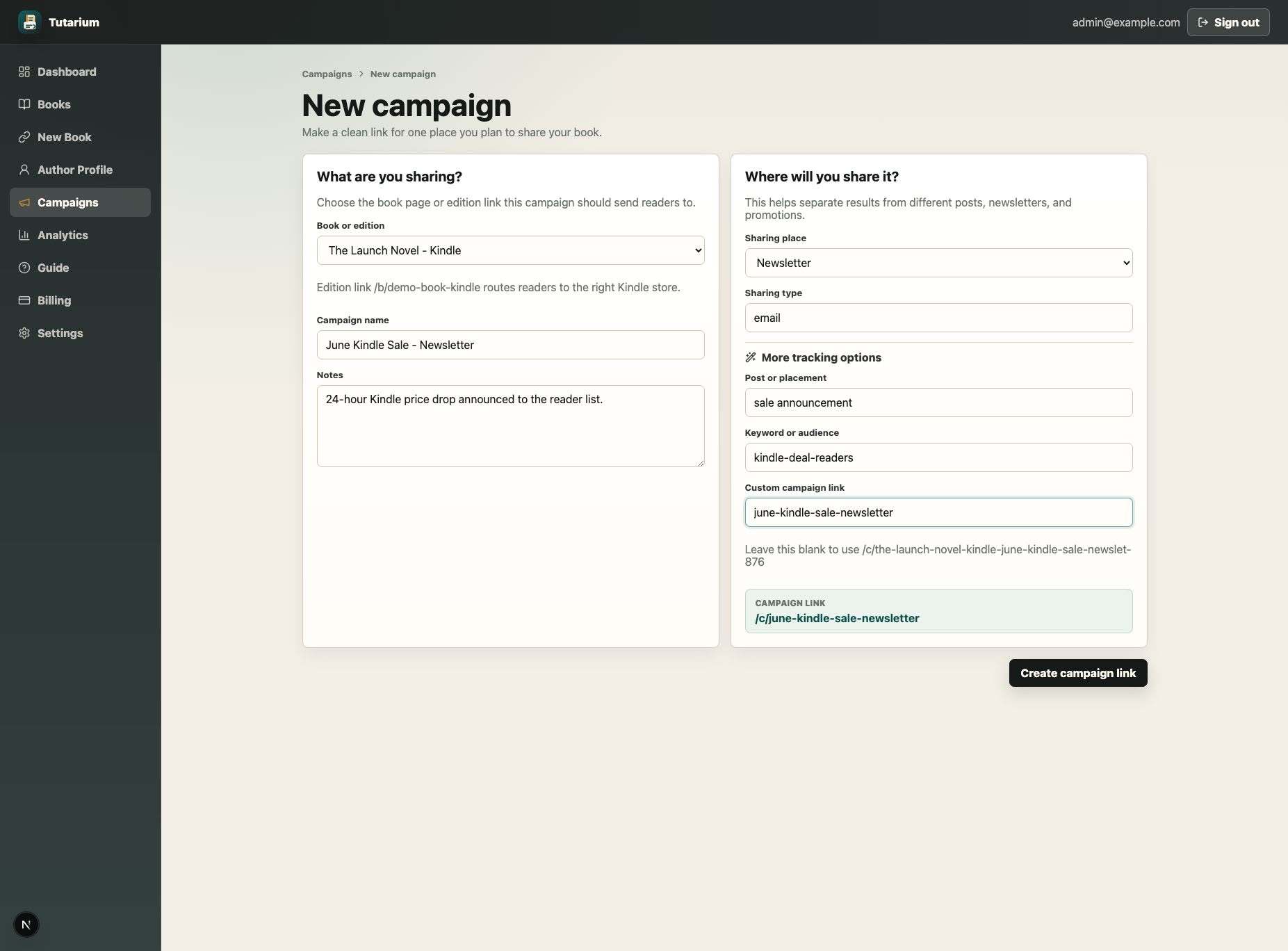
Instead, create a separate campaign link for each place you share the sale.
For example:
- Facebook Kindle sale post
- Newsletter Kindle sale mention
- Instagram bio link
- Website banner
- Reddit post
- Launch week update
Each link can still take readers to the same Kindle book, but now you can see which one people actually clicked.
Use names you will understand later
This does not need to be complicated.
You do not need a perfect naming system.
You just need names that still make sense when you look back in a few weeks or months.
Something like this is fine:
- June Kindle Sale - Facebook
- June Kindle Sale - Newsletter
- June Kindle Sale - Instagram
- Hardcover Launch Kindle Sale
- US Kindle Sale - Facebook Group
The goal is not to impress anyone.
The goal is to make it obvious what each link was used for.
Future you should not need to decode your own campaign names like some cursed archaeological dig.
Track clicks before you worry about sales
Sales matter, obviously.
That is the entire point of running the discount.
But clicks tell you something earlier.
They tell you whether people were interested enough to leave the post, email, or page where they found the link.
For a Kindle sale, I would want to know:
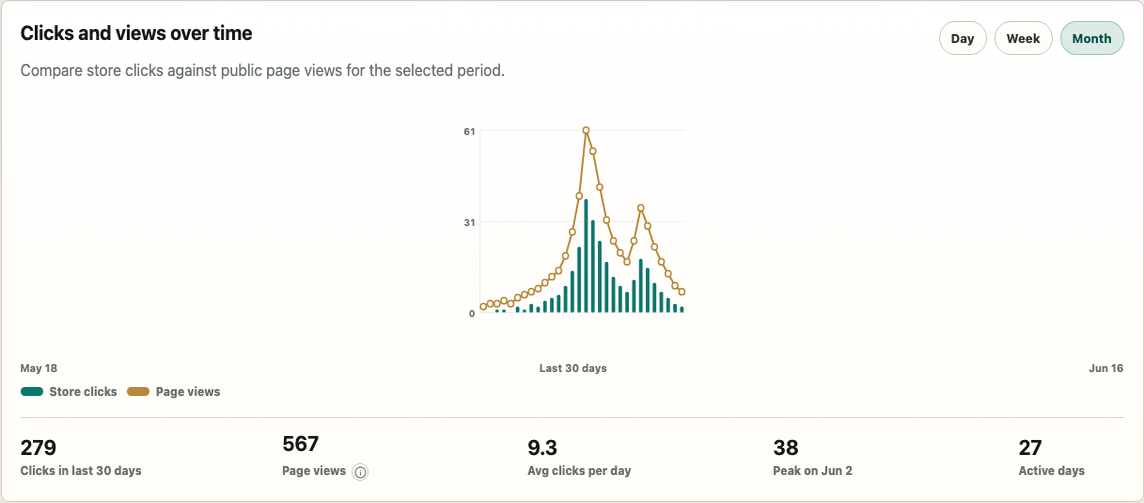
- How many people clicked the sale link
- Which campaign link they clicked
- Which countries they came from
- Which store or buying option they were sent to
- Whether they reached the store at all
That gives you a much clearer picture than just staring at your KDP numbers and trying to guess what caused what.
Check which countries are clicking
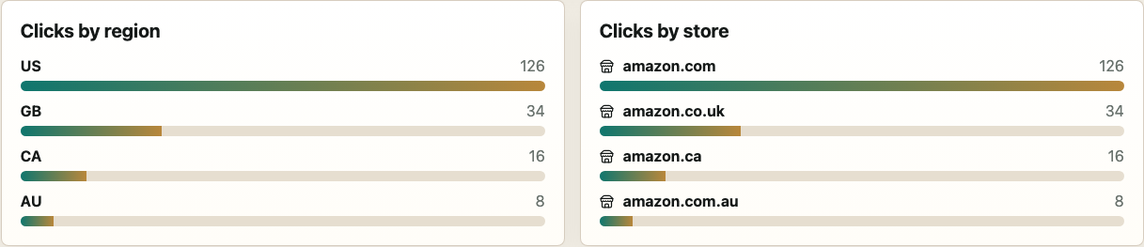
This is especially useful for Kindle sales because not every promotion behaves the same in every country.
You might be promoting a sale on the US Amazon store, but your audience may not be mostly in the US.
If half your clicks are coming from the UK, Canada or Australia, that matters.
It might explain why a post got a lot of interest but fewer sales than expected.
It might also tell you where to focus your next promotion.
For example, if you run a US Kindle sale and most of your clicks come from the US, that is a good sign.
If most of your clicks come from outside the US, you may need to adjust how you describe the sale, or make it clearer which store the discount applies to.
Compare each campaign honestly
Once the sale has been running for a while, compare the links.
You might find something like this:
- Facebook post: 38 clicks
- Newsletter: 74 clicks
- Instagram story: 11 clicks
- Website banner: 6 clicks
That is useful.
It does not tell you everything, but it tells you more than guessing.
If your newsletter sends twice as many people to the book as Facebook, that is worth knowing.
If Instagram gets almost no clicks, you can either improve how you use it or stop wasting time pretending it is doing more than it is.
Marketing is much less painful when the numbers tell you where to spend your energy.
Look for drop-off
A click on your post is not always the same as someone reaching a retailer.
Depending on how your links work, readers may:
- Visit a book landing page
- Get sent straight to the right Amazon store when that route is safe
- See a retailer choice page
- Click through to Amazon, Kobo, Apple Books, Google Play, Barnes & Noble, Bookshop.org, direct sales, or another configured destination
- Leave before reaching the store
That journey matters.
If lots of people click your campaign link but very few continue to a retailer, there may be a problem.
Maybe the page is unclear.
Maybe the wrong edition is being promoted.
Maybe the discount is only available in one region and readers from other countries are confused.
You do not need perfect data.
You just need enough to spot where things are going wrong.
Use what you learn for the next sale
The main reason to track a Kindle sale is not just to measure this one sale.
It is to make the next one better.
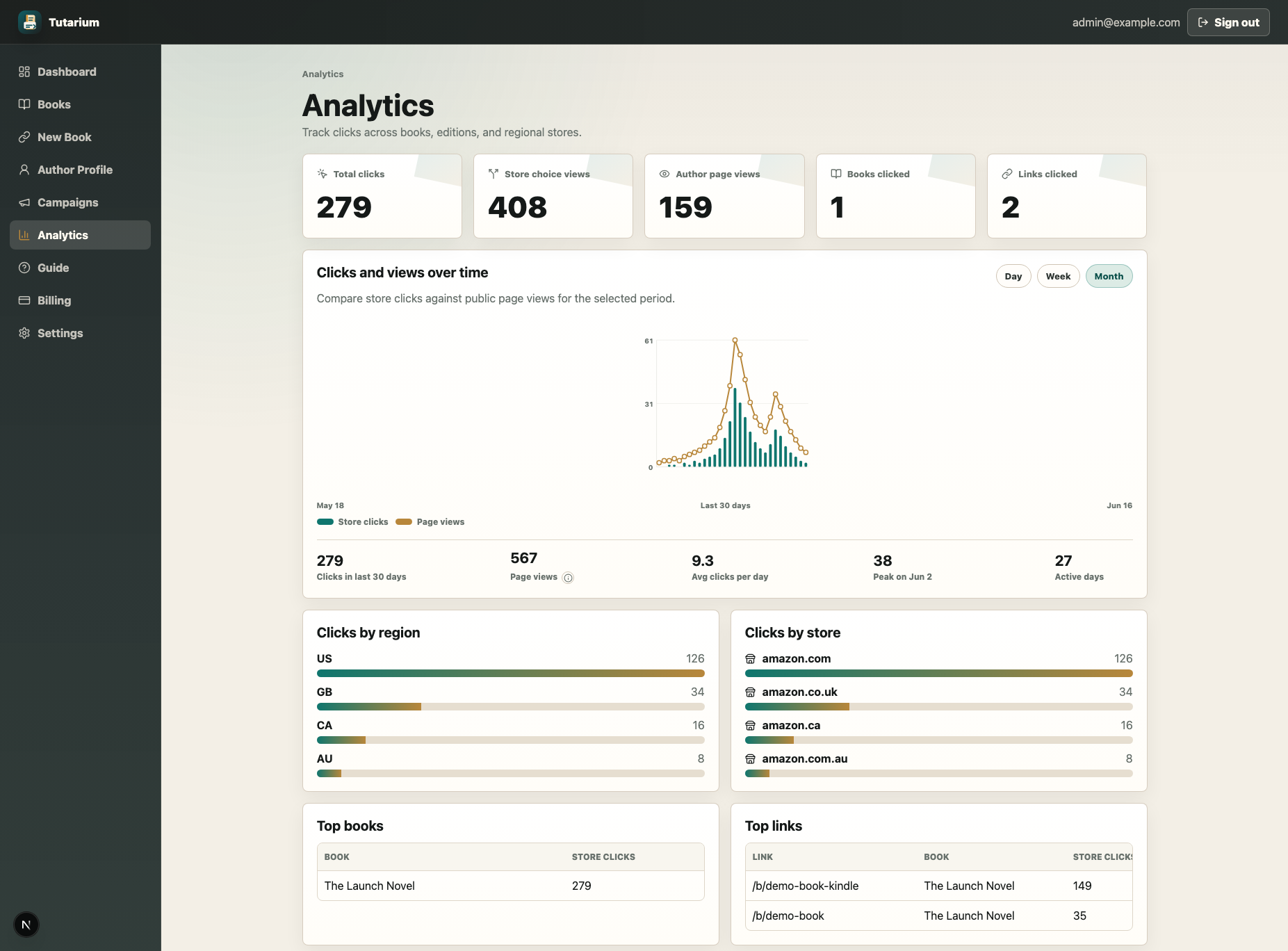
After the sale, you should be able to answer:
- Which platform drove the most clicks?
- Which country showed the most interest?
- Which post worked best?
- Did readers actually reach the intended retailer?
- Was the sale clear enough?
- Is there a channel worth using again?
That is the difference between running a sale and learning from a sale.
One gives you a temporary discount.
The other gives you a better marketing plan.
How I handle this
I built Tutarium because I wanted this kind of tracking for my own book marketing.
I did not want to keep sharing raw Amazon links and hoping for the best.
I wanted to create one book link, create separate campaign links for each post or promotion, send readers to the right Amazon store where possible, show wide retailer options where that was better, and see what actually happened.
For a Kindle sale, that means I can create a dedicated campaign link for each place I mention the discount.
Then I can see which links were clicked, where readers came from, and whether they clicked through to the intended buying option.
That makes the sale easier to understand.
It also makes the next one easier to plan.
Because "I posted about my sale everywhere" is not really a strategy.
"I know my newsletter and Facebook post drove most of the clicks, and most of them came from the US" is much more useful.