Today’s Tutarium release makes the whole path from “I have a book link” to “I know what readers did next” faster, clearer, and much more polished.
The visible changes are substantial: a simpler book import flow, a public book directory, seven book-page layouts, six colour styles, a rebuilt book workspace and editor, a clearer campaign creator, a calmer analytics dashboard, better navigation on small screens, and loading feedback whenever an action needs a moment.
The important part is not the length of that list. It is that these pieces now feel like one connected workflow.
The Short Version
If you already use Tutarium, your existing public book, campaign, edition, and outbound links continue to work. You do not need to replace links you have already shared.
Here is what you can do now:
- Paste a supported store link on the homepage and get a useful head start on a new book.
- Create a public book page with only the essentials, then improve it later.
- Manage a title from a focused workspace with editions, retailers, analytics, campaigns, and page design together.
- Preview multiple layouts and colour styles without changing the live page until you save.
- Build cleaner campaign links with a more guided, visual flow.
- Read performance data from a dashboard designed around decisions instead of disconnected cards.
- Browse recently published public books in the new Books directory.
The updated Tutarium Guide now has focused walkthroughs for each of these jobs.
Start With A Link, Not A Blank Form
Creating a book now begins with the thing most authors already have: a store or sales-page link.
Paste an Amazon, Kobo, Apple Books, Google Play, Barnes & Noble, Bookshop.org, Kickstarter, or direct-sales URL into the new-book flow. Tutarium will classify and import the details it can, then ask you to confirm the essentials. If you do not have a link yet, you can skip that step and start manually.
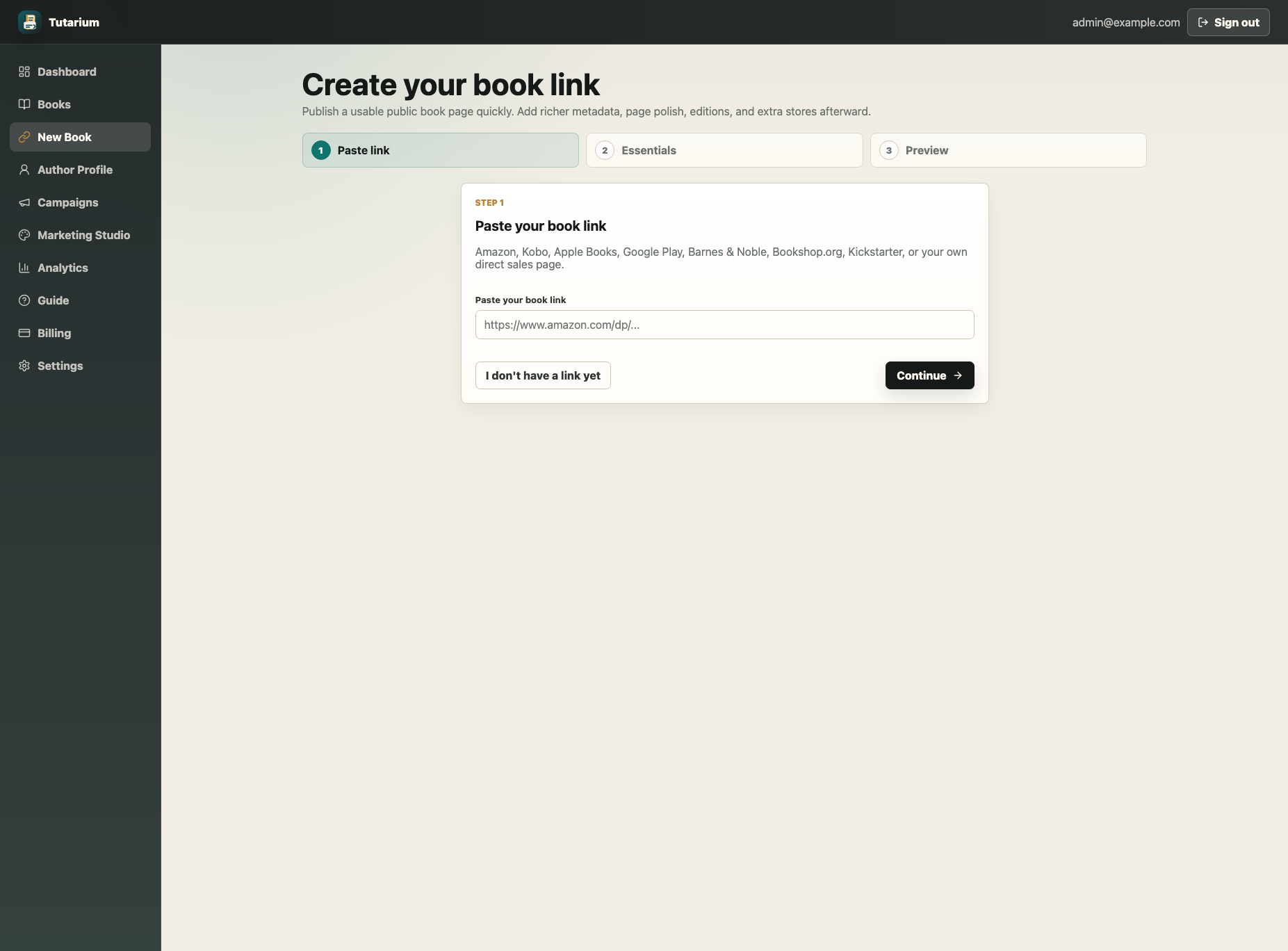
The flow has three deliberately short stages:
- Paste a link, or continue without one.
- Confirm the title and any useful author, cover, or description details.
- Preview and publish the public book link.
You are no longer asked to finish the entire marketing page before you are allowed to create something useful. The success screen points to the logical next jobs—copying the public URL, creating a campaign, building an author profile, or opening the full editor.
Follow the create your first book page guide for the complete path.
One Workspace For The Whole Book
After creation, each book now has a proper workspace rather than a collection of unrelated forms.
The compact header keeps the cover, publication state, public URL, essential metadata, and reader activity visible. Stable local navigation then takes you to editions, buying options, analytics, page design, and settings.
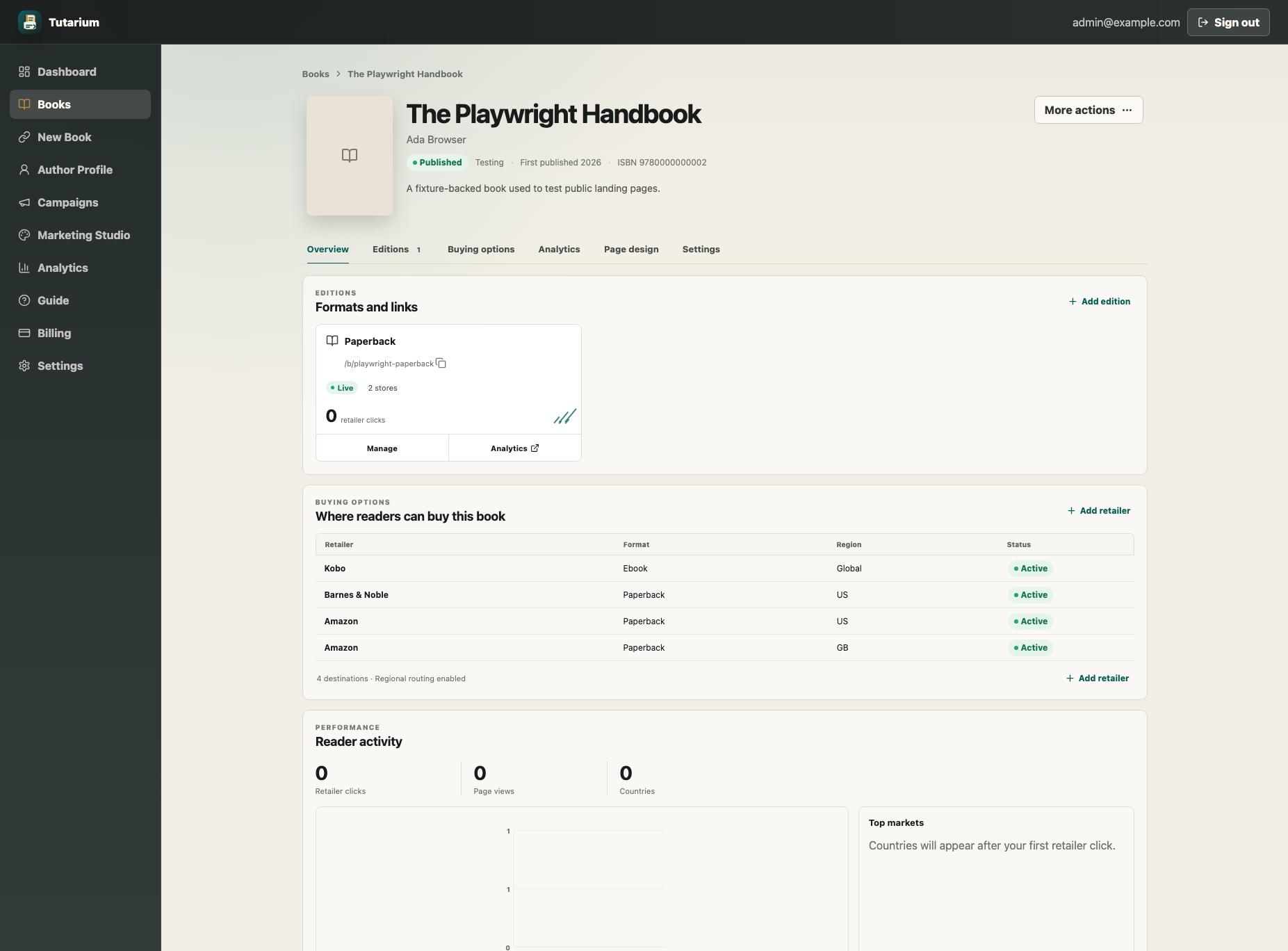
This is where you can answer the practical questions that come up after publishing:
- Is the public page live, and what is its URL?
- Which formats have their own links?
- Which retailers can readers choose?
- How much reader activity has this title received?
- Which campaigns currently point here?
- Where do I change the page copy or appearance?
The workspace also keeps destructive or less frequent actions—such as archiving—inside a restrained More actions menu. Day-to-day tasks remain prominent.
A Book Editor Built Around Reader Decisions
The redesigned editor separates the work into Content, Appearance, and Social & SEO.
Within Content, related fields are grouped around what they do for the reader:
- Book details covers the identity of the title: cover, title, author, subtitle, publisher, and publication date.
- Pitch holds the tagline, descriptions, categories, and tropes that help a reader recognise the book.
- Social proof is for praise, a featured review, and ratings.
- Book information covers series order, page count, language, and reading time.
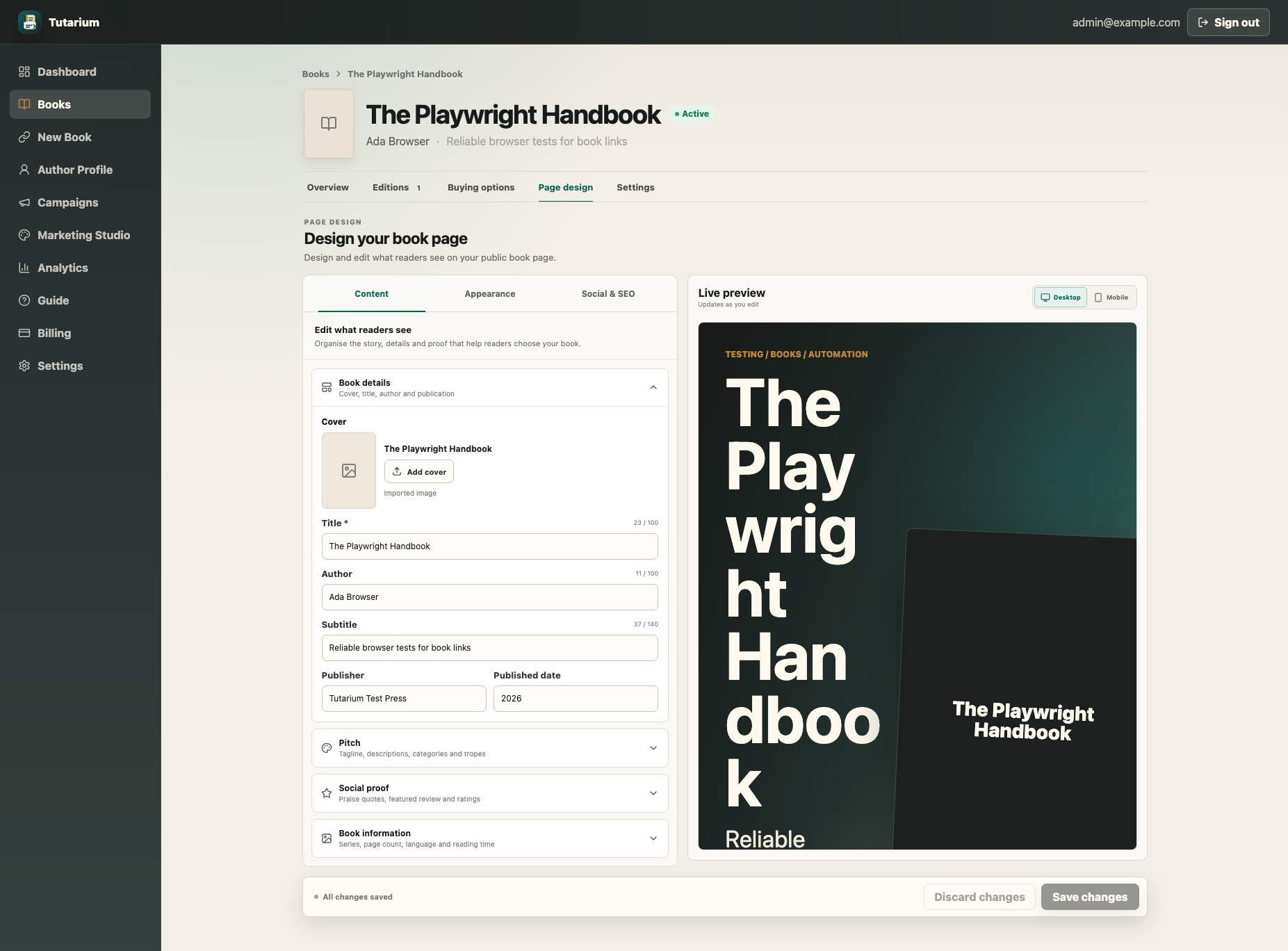
The live preview updates as you edit, but remains non-mutating: previewing does not record public page views, retailer clicks, or structured-data side effects. On mobile, an Edit/Preview switch gives each side of the workflow enough room.
The editing books guide explains what belongs in each section and which fields can safely stay empty.
Seven Layouts And Six Colour Styles
Book pages can now take on a more deliberate visual character without sacrificing the buying path.
Every account can use three core layouts:
- Classic balances cover, pitch, and editions.
- Cover hero gives the artwork and main buying action more presence.
- Review first brings reader praise and social proof forward.
Pro adds four more distinctive choices:
- Modern showcase uses a modular storefront and strong conversion path.
- Cinematic creates a richer, atmospheric cover-led experience.
- Editorial uses a quieter composition inspired by literary presses.
- Reader buzz is energetic and designed for socially driven launches.
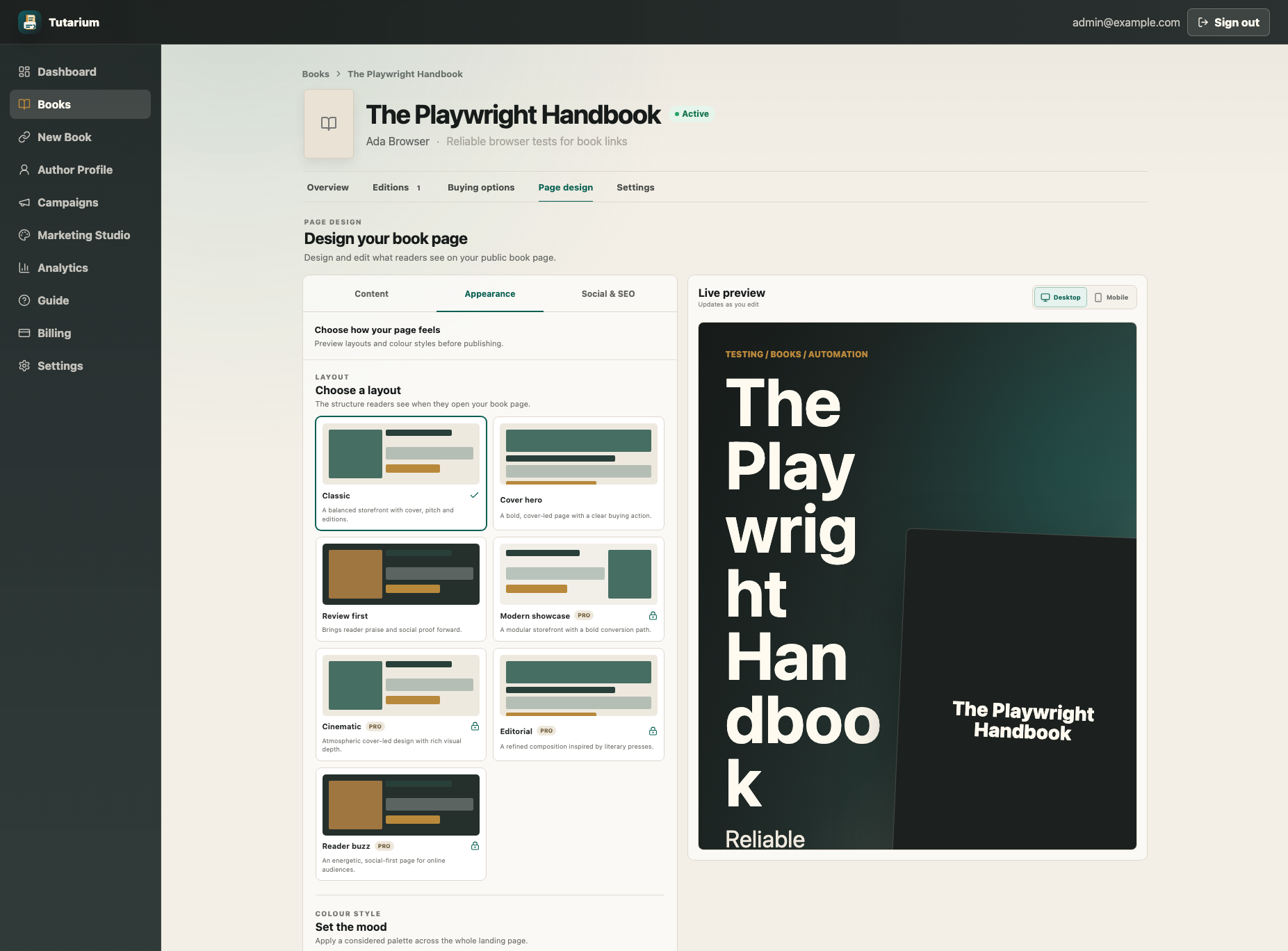
Warm, Dark, and Blue remain available as core colour styles. Pro adds Midnight noir, Neon romance, and Botanical. Free accounts can preview Pro designs before deciding, but the published page does not change until an available combination is saved.
Use the book page design guide to compare the options and check the page at desktop and phone sizes.
Editions And Retailers Are Easier To Understand
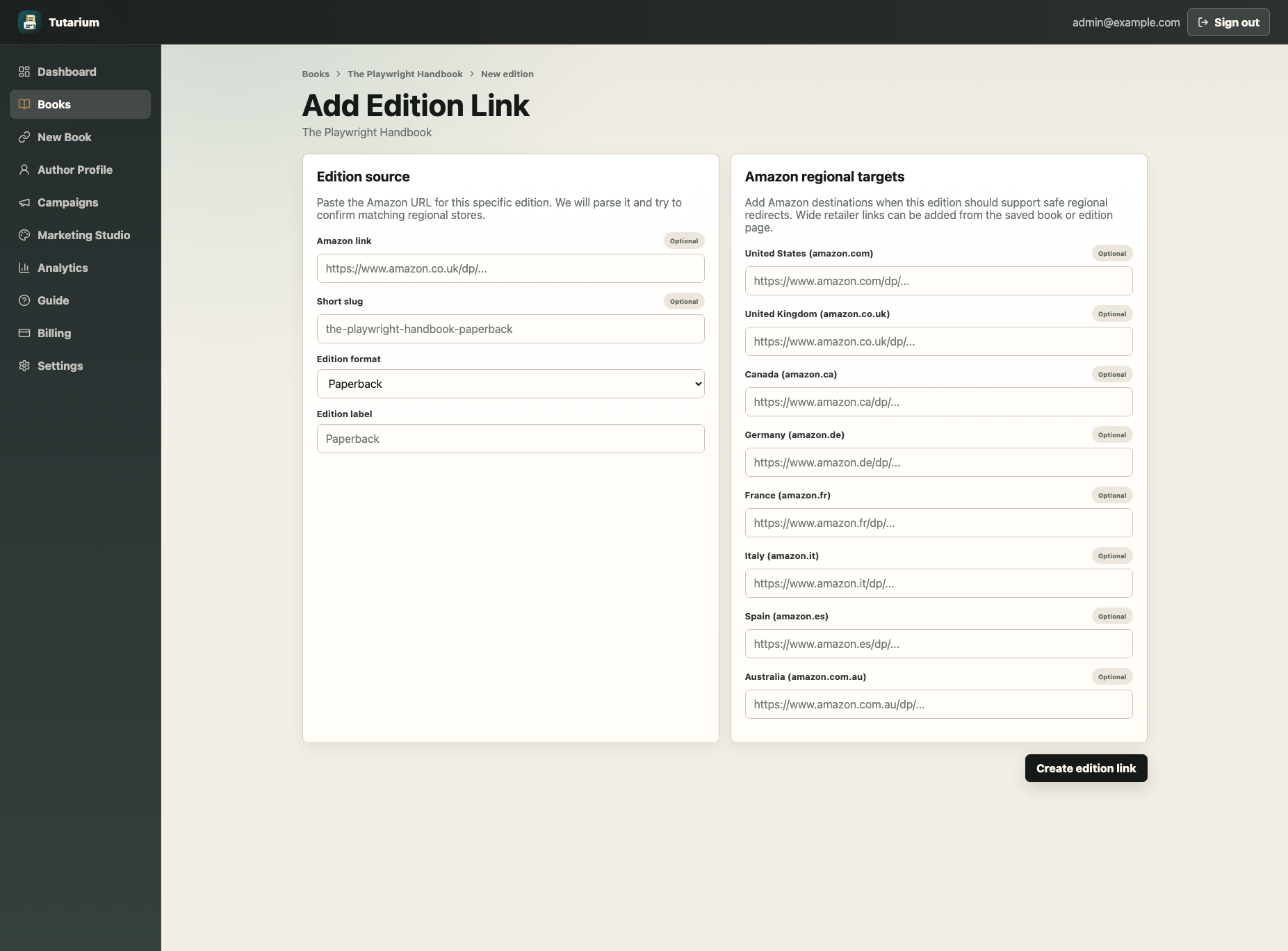
The new book workspace makes an important distinction clearer: an edition is a format; a buying option is a place to buy it.
Create an edition when Kindle, paperback, hardcover, or audiobook needs its own public link and format-specific destinations. Add a retailer to the book when it is simply another store or sales path, such as Kobo, Apple Books, Google Play, Bookshop.org, Kickstarter, or a direct shop.
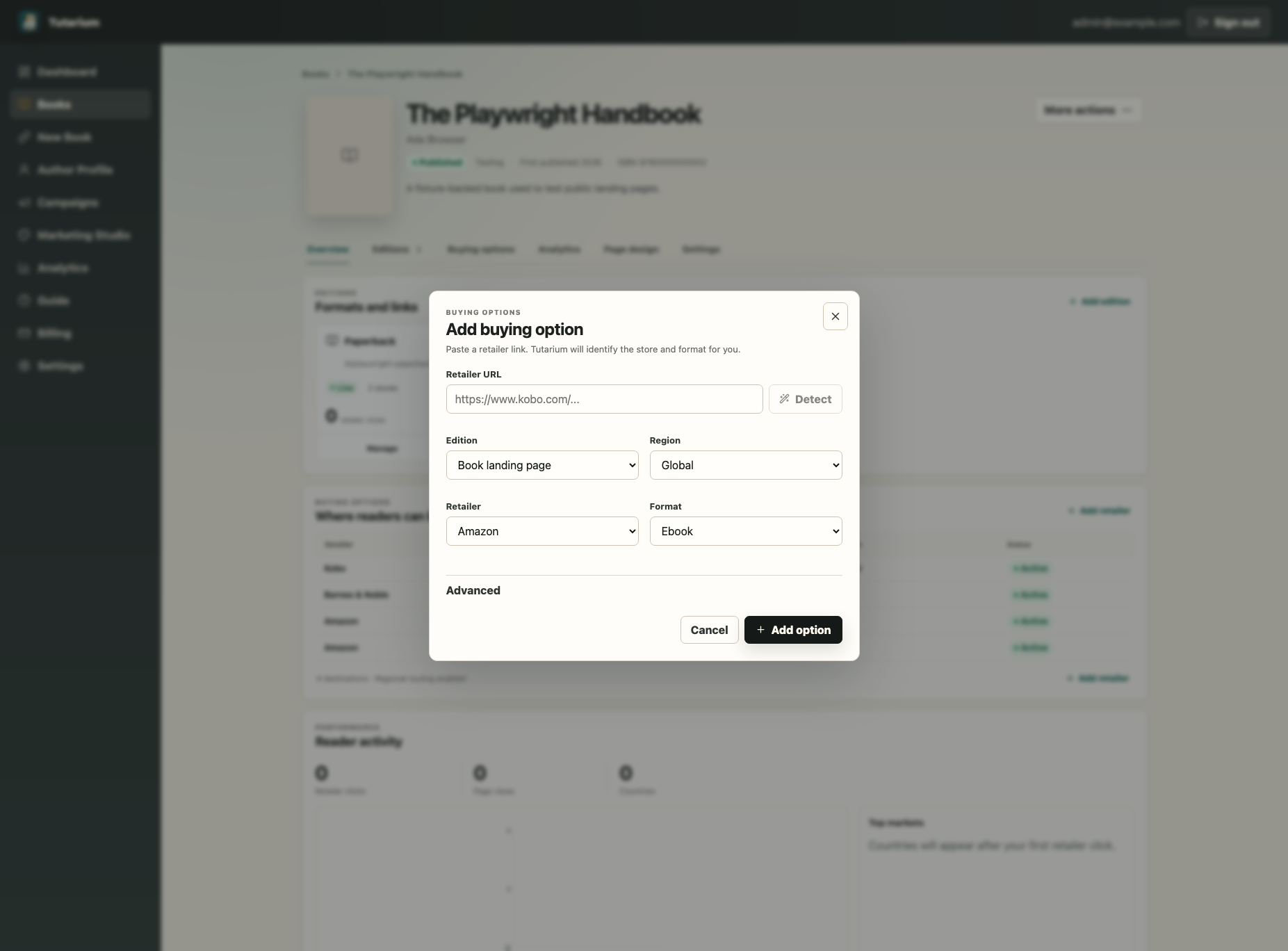
For additional buying options, paste the retailer URL. Tutarium detects supported stores and formats when it can, while leaving the final edition, region, retailer, and format choices visible for confirmation.
Regional Amazon routes remain intentionally safe: Tutarium uses the matching destinations you configure. It does not scrape Amazon or guess that a different product is the same edition.
The editions and buying options guide covers the distinction, regional links, and the preferred main buying action.
Campaign Creation Now Feels Like A Promotion Workflow
The campaign creator has been rebuilt around three questions:
- What are you promoting?
- Where will you share it?
- What name will still make sense in your analytics later?
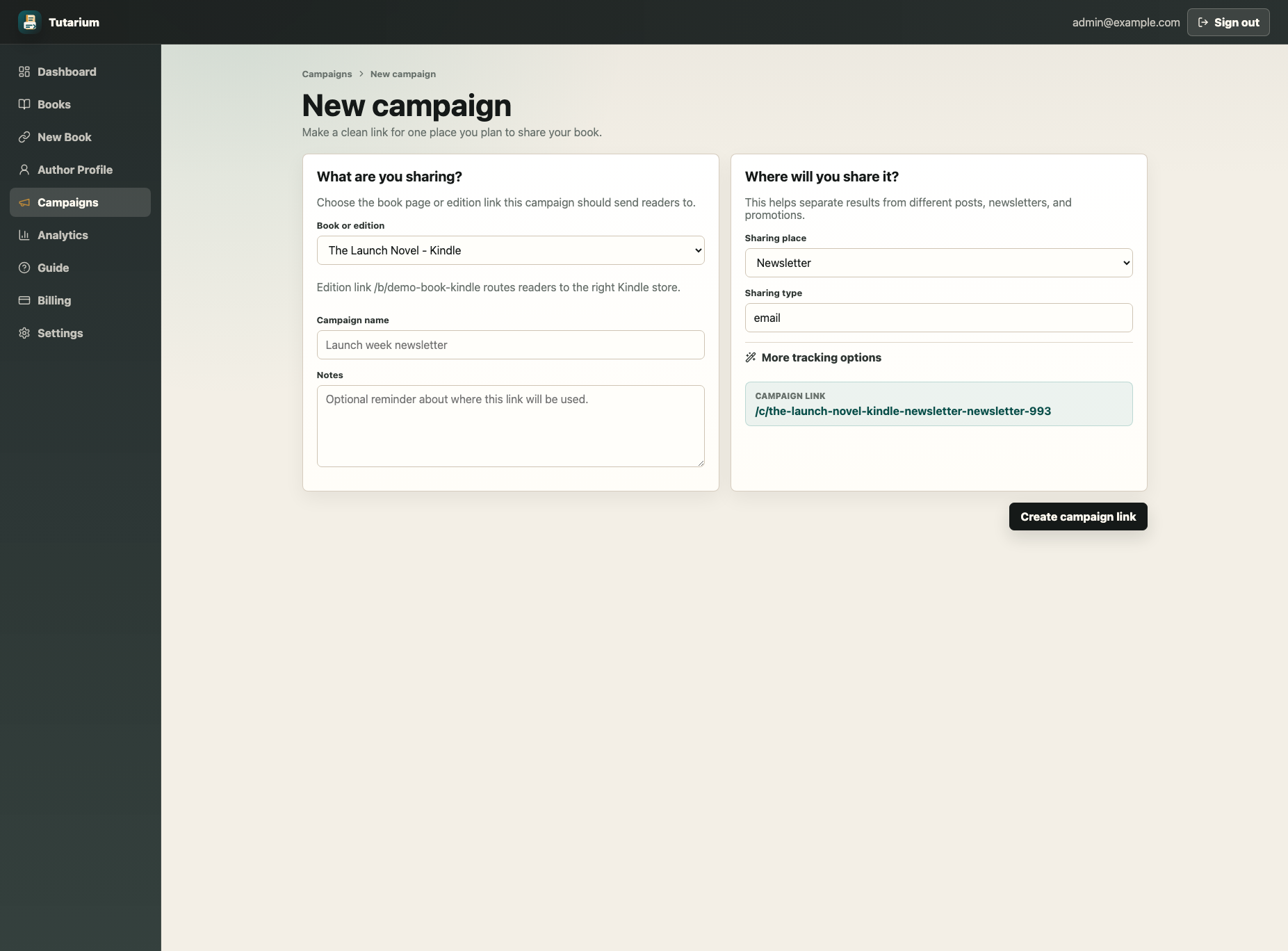
Channel choices are easier to scan, the selected book or edition is visible, and the clean /c link preview updates before creation. The final campaign still feeds into the same shared book and edition routing flow, preserving attribution through the retailer choice page and outbound click.
Existing campaign URLs have not changed. Archived campaigns also continue resolving publicly so links already printed or shared do not break.
A Calmer Dashboard With Better Answers
The dashboard has moved away from a wall of equal-weight cards. It now starts with a compact orientation, a restrained performance summary, a real activity chart, top markets, recent activity, and direct routes into the work that needs attention.
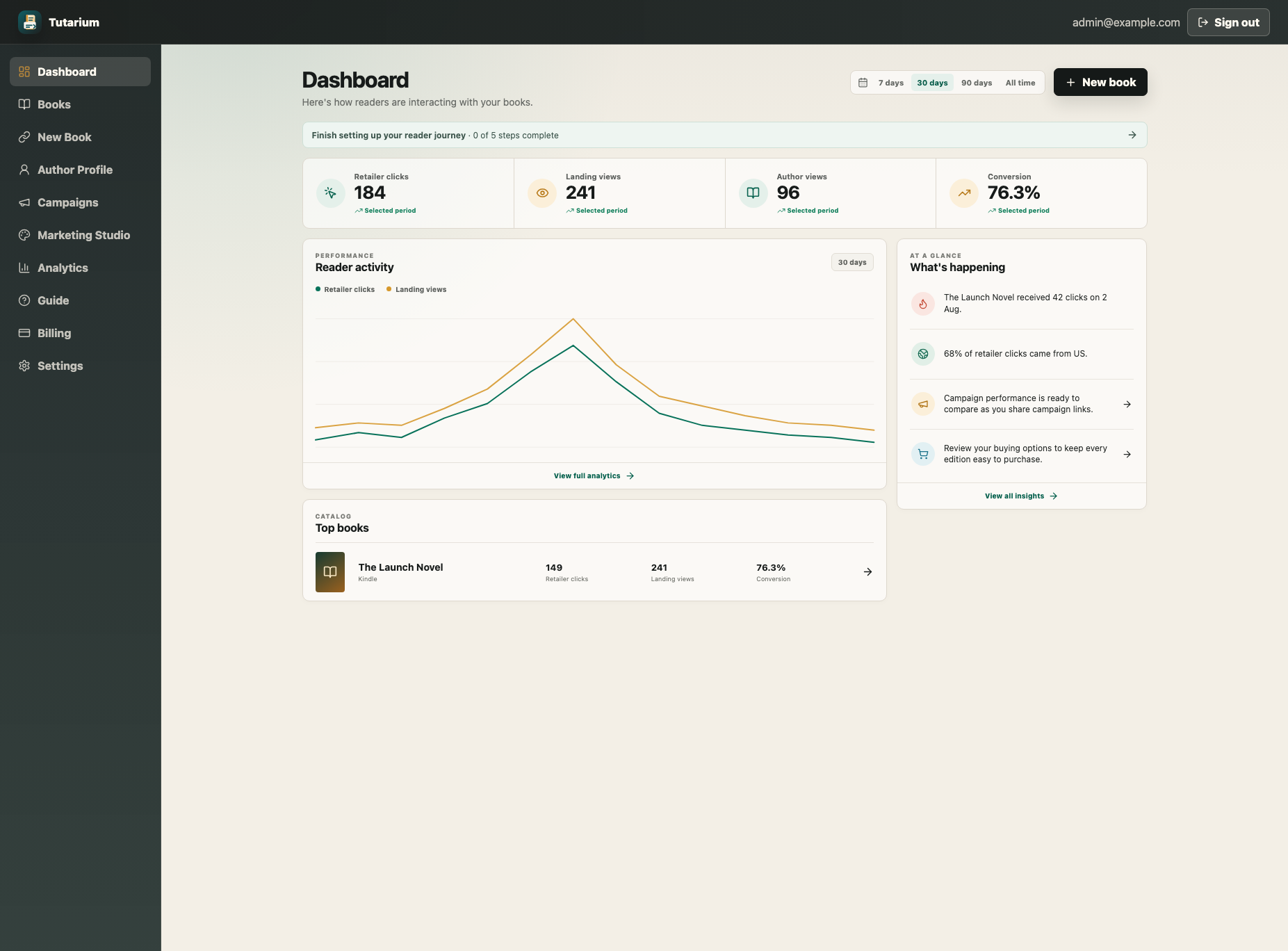
The broader admin experience follows the same model: compact context first, stable local navigation where a resource needs it, then a focused workspace. Analytics, campaigns, editions, billing, settings, author profiles, Marketing Studio, and the internal insight surfaces now share the warmer Tutarium visual language without hiding useful detail.
Forms and server actions also show a full-page progress message while work is being saved, generated, or published. Data-backed admin routes use a consistent skeleton while they load. Those details matter: a calm interface should never leave you wondering whether a click worked.
Better Navigation On Every Screen
Public navigation now has a dedicated Books link, a clearer dashboard action, and a full mobile menu for Features, Campaign Links, Analytics, Author Pages, Pricing, Guides, Blog, and the public book directory.
The authenticated mobile navigation has also been rebuilt so the dashboard remains usable on narrow screens rather than compressing a desktop sidebar into the available space.
Together, these changes make it easier to move between learning about a feature, seeing a public example, and doing the work in the dashboard.
Discover Public Books
The new Books directory gives active public titles a browsable home on Tutarium. Recent books also appear in the homepage flow after the main product story, giving readers a direct path into real book pages without distracting from the author workflow.
Only active public book links appear. Archived or unavailable titles stay out of the directory, and each listing leads into the same reader-focused /b page and marketplace choice flow used everywhere else.
What To Do Next
There is no migration checklist for this release. Existing links remain valid.
For an existing title, the most useful review is:
- Open Books and select the title.
- Confirm its public URL, editions, and buying options.
- Open Page design and review Content, Appearance, and Social & SEO.
- Preview the page at desktop and mobile sizes.
- Save only when the reader path is clear, then open the live page once more.
If you are starting fresh, paste a store link into Tutarium and publish the smallest useful version first. You can add the richer page, retailer choices, and campaign tracking in manageable steps.
This release is about making those steps feel connected—and making the result feel worthy of the books you are sending readers to discover.